I fear I may start ranting again.
It maybe that I'm not passionate enough on any particular topic to be involved in a newsgroup and I find the whole arena of this type entertainment extremely boring. After viewing some groups the conversation appears to transcend into mindless banter—have you every seen a group of budgies, there all talking at the same time but saying nothing. If I want this type of puerile recreation I'll go down to the pub and converse with my mates. At least its face to face and I can judge whether they're just crapping on.
I have no doubt there are newsgroups on the web that provide a valuable service, but looking through some of Google Groups it's difficult locate one without wasting an enormous amount of time. Maybe the key to this type of communication is perseverance or having someone invite you to join the group. Having a mole on the inside saves time.
OK, I have no desire to get a zero mark for this so I better say something constructive.
more soon
Tuesday, March 17, 2009

Monday, March 16, 2009
List part 1—a deviants playground
What are the pros and cons of email lists versus discussion boards?
Ok, so maybe I'm a cynic but I think most "Lists" are for degenerates with empty lives praying on vulnerable and naive souls. I hope it's a matter of misfortune or just bad luck in coming across inappropriate Lists.
As suggested in Module 2 notes I visited http://lists.topica.com/ with an open mind to join in on a "List". I then clicked on one of the subjects, Art & Design, then I proceeded to Digital Art Solutions which was described as Tips, news, and info for graphic professionals. So what did I find listed out of the 5 possible groups I could make a valued contribution, 5 pron sites. My first instincts were proven correct. Now I'm all for free speech, but, the web needs to be cleaned up, there's way too much crap about. If I was an alien with superior technology scanning the universe to find intelligent life and I came across the web from the planet Earth, I really would think it was Planet of the Apes -20%.
However, I must not paint all Lists with the same broad brush.
So I tried again, this time I selected the Astronomy Digest, written in its description was a length list of vulgarity, porn sites again.
The third go was a little better, I joined a photography List and I will report back soon.
However, I refuse the believe all Lists are as narcissistic or hedonistic as the people who contribute at http://lists.topica.com/. This site is a spawning ground for the devils work. Why would you waste time on people you just can't trust and where everything comes into question over the information that's being broadcast. If the academics say you can't trust Wikipedia, why the hell would you be bothered with an unmediated service. So if the very nature of truth comes into question and deception is an everyday occurrence for this site, how can this be a worthy experience.
In the end cyber-relation creeps into normal life, very slowly but surely. Sites like http://lists.topica.com/ are the asshole of the web.
Sterile list of Pros:
Creative list of Cons: a very apt word for this type of Lists
groups. These can work in a very powerful way when used to better ones self.
Are there certain kinds of communication or purposes more suited to one than the other?
I find the Listserv that I subscribe to predominatly tend to be one-way communications, receiving newsletters and information for use in hobbies, finance or sport. The information that I read from a list I may like to act on but I will very rarely contribute to.
Discussion boards are used for more of a two-way communication, listening and contributing to the posts and threads. There is usually a mediator to oversee the content and by their very nature tend to be more respectful, considerate and stay targeted to the purpose it was created for.
OK, maybe not all List are bad, I think I will need to investigate further.
Ok, so maybe I'm a cynic but I think most "Lists" are for degenerates with empty lives praying on vulnerable and naive souls. I hope it's a matter of misfortune or just bad luck in coming across inappropriate Lists.
As suggested in Module 2 notes I visited http://lists.topica.com/ with an open mind to join in on a "List". I then clicked on one of the subjects, Art & Design, then I proceeded to Digital Art Solutions which was described as Tips, news, and info for graphic professionals. So what did I find listed out of the 5 possible groups I could make a valued contribution, 5 pron sites. My first instincts were proven correct. Now I'm all for free speech, but, the web needs to be cleaned up, there's way too much crap about. If I was an alien with superior technology scanning the universe to find intelligent life and I came across the web from the planet Earth, I really would think it was Planet of the Apes -20%.
However, I must not paint all Lists with the same broad brush.
So I tried again, this time I selected the Astronomy Digest, written in its description was a length list of vulgarity, porn sites again.
The third go was a little better, I joined a photography List and I will report back soon.
However, I refuse the believe all Lists are as narcissistic or hedonistic as the people who contribute at http://lists.topica.com/. This site is a spawning ground for the devils work. Why would you waste time on people you just can't trust and where everything comes into question over the information that's being broadcast. If the academics say you can't trust Wikipedia, why the hell would you be bothered with an unmediated service. So if the very nature of truth comes into question and deception is an everyday occurrence for this site, how can this be a worthy experience.
In the end cyber-relation creeps into normal life, very slowly but surely. Sites like http://lists.topica.com/ are the asshole of the web.
Sterile list of Pros:
- communicate with a broad group of people inexpensively
- efficient method of dispersing information to members
- still waiting to find another
- not good for communicating on an individual to individual basis
- mishandled email list can be sold to spammers
- unmediated content can quickly go bush (go off track) and be a complete waste of time
- poorly run group will just become a pain in the ass and clutter your Inbox when in content degrades into rambling conversations.
Creative list of Cons: a very apt word for this type of Lists
- lists are like the Catholic church, one way communication. Dictating their doctrine views without listening to the followers. see ABC Compass
- breading ground depravity (like a very nasty rash or venereal disease)
- easy to broadcast your thoughts to similar pervert and create a community of would-be sex offenders
- induce misconceptions and deceit
- powerful tool to incite hatred and racist groups KKK, http://www.christianconcepts.net/informat.htm or the Nazi Party, http://www.americannaziparty.com/index.php. Call me paranoid but I have not directly linked these sites as I have no wish for these types of people to have a look at their referral list and see my details. So if you would like to view these sites then copy the address and past it into your browser.
groups. These can work in a very powerful way when used to better ones self.
Are there certain kinds of communication or purposes more suited to one than the other?
I find the Listserv that I subscribe to predominatly tend to be one-way communications, receiving newsletters and information for use in hobbies, finance or sport. The information that I read from a list I may like to act on but I will very rarely contribute to.
Discussion boards are used for more of a two-way communication, listening and contributing to the posts and threads. There is usually a mediator to oversee the content and by their very nature tend to be more respectful, considerate and stay targeted to the purpose it was created for.
OK, maybe not all List are bad, I think I will need to investigate further.
To "folder structure" or not to "folder structure" that is the question
5. How have you organised the folder structure of your email and why?
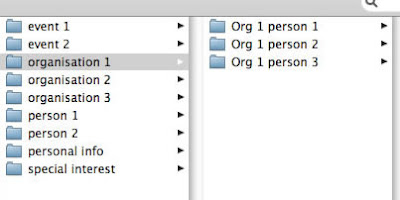
I wish I could have the control that I have in Adobe Bridge managing files incorporated into emails—within Bridge I have access to a fantastic array of options but in the email software it's basic. The screen shot below is not the actual email folder, it's just a sample of the type of structure I employ managing emails. I can't show you the real information, you know how the saying goes "if I show you, I'd have to kill you". I don't know who said that so I can't quote it.
I know I have already answered this question below but folder structure is closely connected to filters and they have a symbiotic relationship. I employ this process to presort the emails into folders, this saves time by having the computer do the mindless monkey work and leaving my ape brain + 2% to work on the creative tasks. (The chimpanzee is only 2% different from humans genetically, (Jane Goodall, Hope for Harvest, 2005). Scary, it should be called Planet of the Apes +2%.)
email structure
Adobe Bridge structure
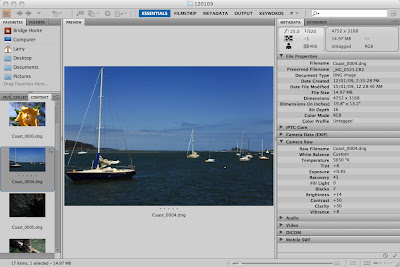
I wish I could have the control that I have in Adobe Bridge managing files incorporated into emails—within Bridge I have access to a fantastic array of options but in the email software it's basic. The screen shot below is not the actual email folder, it's just a sample of the type of structure I employ managing emails. I can't show you the real information, you know how the saying goes "if I show you, I'd have to kill you". I don't know who said that so I can't quote it.
I know I have already answered this question below but folder structure is closely connected to filters and they have a symbiotic relationship. I employ this process to presort the emails into folders, this saves time by having the computer do the mindless monkey work and leaving my ape brain + 2% to work on the creative tasks. (The chimpanzee is only 2% different from humans genetically, (Jane Goodall, Hope for Harvest, 2005). Scary, it should be called Planet of the Apes +2%.)
email structure

Adobe Bridge structure

Saturday, March 14, 2009
Health caution "Always use filters"
4. What sorts of filters or rules do you have set up, and for what purpose?
Filters are a great time saver if you are constantly receiving emails that contain a similar message thread, from a group of friends or work associates, or other pattern forming expressions. The function is very similar to a GREP search (global regular expression print), it just looks for regular patterns in text, in this case to sort emails into presorted folders. (I use GREP search in Adobe InDesign, a graphic design tool.)
Although the filters in email software are very limited in their search function they can still handle most of the sorting work before I have to intervene. My normal work flow is to set sub folders that I can manage through Thunderbird (yes it's a tacky name but its a good email package, they should have a Australian version named CockyChatter - I must register that name, it sounds cool) and use the "create filter from message" button to set up parameters. Depending on whom I'm communicating with, the sub folders are arranged by group titles such as organisations, events, special interest, things to do, and then there's one for all the rest - emails that are one-offs. To presort the emails into the folders I use searches that contain the sender's name, subject, info that might be contained in the body of the email and so on. Once the email threads are finished I can easily archive the folder.
Generally, the types of filters one may use greatly depends on one's imagination, so be creative and think about it. They are a fabulous time saver.
Also anything that falls outside the filters in my case are usually spam, so it's an efficient way to manage something that can get into an awful mess very quickly.
Filters are a great time saver if you are constantly receiving emails that contain a similar message thread, from a group of friends or work associates, or other pattern forming expressions. The function is very similar to a GREP search (global regular expression print), it just looks for regular patterns in text, in this case to sort emails into presorted folders. (I use GREP search in Adobe InDesign, a graphic design tool.)
Although the filters in email software are very limited in their search function they can still handle most of the sorting work before I have to intervene. My normal work flow is to set sub folders that I can manage through Thunderbird (yes it's a tacky name but its a good email package, they should have a Australian version named CockyChatter - I must register that name, it sounds cool) and use the "create filter from message" button to set up parameters. Depending on whom I'm communicating with, the sub folders are arranged by group titles such as organisations, events, special interest, things to do, and then there's one for all the rest - emails that are one-offs. To presort the emails into the folders I use searches that contain the sender's name, subject, info that might be contained in the body of the email and so on. Once the email threads are finished I can easily archive the folder.
Generally, the types of filters one may use greatly depends on one's imagination, so be creative and think about it. They are a fabulous time saver.
Also anything that falls outside the filters in my case are usually spam, so it's an efficient way to manage something that can get into an awful mess very quickly.
Friday, March 13, 2009
Email part 3, Opening the attachment 'big money to be made'
3. In what ways can you ensure that an attachment you send will be easily opened by the receiver?
Opening attachments can bite you on the computer bum, so be careful!
To ensure the recipient is always able to open attachments, you must first offer them something amazing.
I was toying with the idea to include the following in the subject line:
But getting back to it.
Format of attachments
To ensure the recipient can open any of my attachments I will usually only send pdf files. If I suspect the person has limited experience in using computers I will include the url to download the Adobe Acrobat Reader with a short explanation of how and why. http://www.adobe.com/au/
If I'm forced to use something other than Acrobat I will first determine which format they can accept before I send the email eg MicroSoft Word, Excel and so on.
Encoding
As suggested in Module Two notes "First: communicate about your computer systems. Sometimes, when you expect to send attachments, particularly to users whom you suspect may not be as knowledgeable as you about attachments, you need to seek information from them and to assist them in dealing with the attachment."
I would think it would be highly unlikely that many people know anything about encoding email messages or its purpose, so I would certainly not be contacting the recipient as my first action. I would either follow up the original email with a phone call or send another email without the attachment and ask if they received the first successfully. Bothering people about something that doesn't interest them is just likely to annoy them. (Hey, if I don't like someone I should change the encoding on my email.)
When the encoding fails
Below is a picture of my beautiful dog after a swim at the beach, the image of Lizzy was correctly encoded to show the jpg as intended.

Below is the email opened with a text editor that shows the picture as ASCII text.
"e-mail messages can contain only text information, and attachments aren't text" howstuffworks, http://communication.howstuffworks.com/email5.htm
Because the file I was emailing was not text, the email software is required to encode the image before sending, the encoding used was MIME (Multipurpose Internet Mail Extensions). If the receiving email software is using different encoding such as, uuencode, Base64 or BinHex the image will not render and you will need to do some heavy maths or some creative thinking to interpret the attachment. Below is a sample of the same image of Lizzy but opened in a text editor. The text editor is only a basic word processor and will not interpret code or render the image.

If that fails I could format the attachment in html and place it directly into the body of the email, or just use ASCII text in the body of the email, assuming there are no images.
Of course there is always fax, sail mail, carrier pigeon or I could get on my bike and start peddling. I just hope its not overseas because I may need a snorkel.
Opening attachments can bite you on the computer bum, so be careful!
To ensure the recipient is always able to open attachments, you must first offer them something amazing.
I was toying with the idea to include the following in the subject line:
- love from
- easy money from Nigeria
- increase the length of your nose
- free Viagra to help the dead stay stiff
- update your details from the banks of the world
- secure your place in the after world
But getting back to it.
Format of attachments
To ensure the recipient can open any of my attachments I will usually only send pdf files. If I suspect the person has limited experience in using computers I will include the url to download the Adobe Acrobat Reader with a short explanation of how and why. http://www.adobe.com/au/
If I'm forced to use something other than Acrobat I will first determine which format they can accept before I send the email eg MicroSoft Word, Excel and so on.
Encoding
As suggested in Module Two notes "First: communicate about your computer systems. Sometimes, when you expect to send attachments, particularly to users whom you suspect may not be as knowledgeable as you about attachments, you need to seek information from them and to assist them in dealing with the attachment."
I would think it would be highly unlikely that many people know anything about encoding email messages or its purpose, so I would certainly not be contacting the recipient as my first action. I would either follow up the original email with a phone call or send another email without the attachment and ask if they received the first successfully. Bothering people about something that doesn't interest them is just likely to annoy them. (Hey, if I don't like someone I should change the encoding on my email.)
When the encoding fails
Below is a picture of my beautiful dog after a swim at the beach, the image of Lizzy was correctly encoded to show the jpg as intended.

Below is the email opened with a text editor that shows the picture as ASCII text.
"e-mail messages can contain only text information, and attachments aren't text" howstuffworks, http://communication.howstuffworks.com/email5.htm
Because the file I was emailing was not text, the email software is required to encode the image before sending, the encoding used was MIME (Multipurpose Internet Mail Extensions). If the receiving email software is using different encoding such as, uuencode, Base64 or BinHex the image will not render and you will need to do some heavy maths or some creative thinking to interpret the attachment. Below is a sample of the same image of Lizzy but opened in a text editor. The text editor is only a basic word processor and will not interpret code or render the image.

If that fails I could format the attachment in html and place it directly into the body of the email, or just use ASCII text in the body of the email, assuming there are no images.
Of course there is always fax, sail mail, carrier pigeon or I could get on my bike and start peddling. I just hope its not overseas because I may need a snorkel.
Thursday, March 12, 2009
Email-part 2, you can't say no to "cc" or "bcc" but you can "reply"
2. In what cases would you find it useful to use the 'cc', 'bcc' and 'reply all functions of email?
How useful is "cc"—carbon copy, "bcc"—blind carbon copy and the "reply" button.
In the past I have only used "cc" and "bcc" sparingly, mainly because I had no reason to and I never really understood the difference between using the multiple "to" functions and "cc" but from reading Module Two notes all was explained. You can quickly forget that there are such things as email ethics hiding behind the computer screen. I have taken points from this lesson and I trust will make me a better person. (If not, at least abuse the system more efficiently.)
In brief
The "to" function is to direct the communication at a particular person or persons.
The "cc" function is just to spread the love further and keep others informed—it may not necessarily require the receiver to action on receipt. It's usually for 'your information only'—FYI.
The "bcc" function is for ratting on your work mates to your boss without them knowing you have passed on the same information in one easy process. This is probably used in ASIO a lot. In my experience it's also used in "request for quotes" or "request for tenders", when the sender is required to keep details of who else is invited to quote, secret.
The "Reply" function is when I need to keep a copy of the previous email within the body, hence "quoting" or maintaining the thread of the conversation in the one document. or. When I'm just too lazy and I need to quickly respond to someone, even if the threads don't follow and the conversation wonders all over the place.
I have received emails from people that I suspect may have "bcc" in the original email and have often wondered if that information can be extracted. Please leave a comment if you can help me out.
How useful is "cc"—carbon copy, "bcc"—blind carbon copy and the "reply" button.
In the past I have only used "cc" and "bcc" sparingly, mainly because I had no reason to and I never really understood the difference between using the multiple "to" functions and "cc" but from reading Module Two notes all was explained. You can quickly forget that there are such things as email ethics hiding behind the computer screen. I have taken points from this lesson and I trust will make me a better person. (If not, at least abuse the system more efficiently.)
In brief
The "to" function is to direct the communication at a particular person or persons.
The "cc" function is just to spread the love further and keep others informed—it may not necessarily require the receiver to action on receipt. It's usually for 'your information only'—FYI.
The "bcc" function is for ratting on your work mates to your boss without them knowing you have passed on the same information in one easy process. This is probably used in ASIO a lot. In my experience it's also used in "request for quotes" or "request for tenders", when the sender is required to keep details of who else is invited to quote, secret.
The "Reply" function is when I need to keep a copy of the previous email within the body, hence "quoting" or maintaining the thread of the conversation in the one document. or. When I'm just too lazy and I need to quickly respond to someone, even if the threads don't follow and the conversation wonders all over the place.
I have received emails from people that I suspect may have "bcc" in the original email and have often wondered if that information can be extracted. Please leave a comment if you can help me out.
Subscribe to:
Posts (Atom)

 Posts
Posts

